SimLauncher
I got tired of launching a half dozen apps every time I wanted to go for a drive, so I designed and built this tool to do it all in one click.
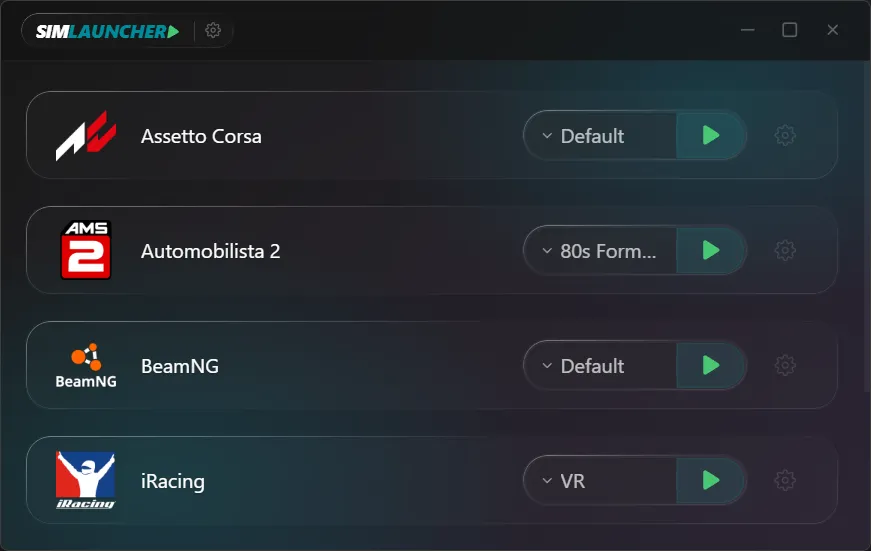
My own sim racing rig got complicated enough that getting a car on track started to feel like a pre-flight checklist. VR, motion software, SimHub for the dashboard, Crew Chief for my spotter, and a few other overlays all had to be started in a specific sequence. Forgetting a step or getting the order wrong was common. I wanted to solve that friction between deciding to drive and actually driving. That's why I built SimLauncher.
It's a simple tool to manage that complexity. The whole system is built around per-game profiles, where you can define exactly which companion apps launch, in what order, and with specific delays between them. When you exit your main sim, it automatically closes everything for you. It supports over twenty different sims out of the box and has slots for custom apps if your favorite isn't on the list. It just gets everything out of the way.
I recently gave the app a complete visual overhaul using a glassmorphism design language, with proper light and dark themes. Since I built it for my own use first, it was important that it remain a tool for the community, not a product. It's fully open source under the GPL v3 license and will be free forever. No premium tiers, no feature gates. It just works.
Tools
The UI was designed in Figma. The codebase is built with heavy use of AI coding assistants: Claude Code and OpenAI Codex for most of the implementation, Gemini for code review and architecture sanity checks, and Antigravity as the IDE-level harness pulling those agents together. I am open about this because it's central to how the project moves at this pace as a solo build.